So, this is an extensive and sometimes boring matter but also essential.
I’m going to start with latches and flip-flops and hopefully end in the RAM/DRAM and the newer memory systems.
Latch/Flip-flops
For a fresh start and just for contextualization, latches and flip-flops are bi-stable memory elements. That means they can hold binary information depending on the state.
The difference between the two is that the latch is level-sensitive, it stays transparent and keeps the input and output in check the whole time the enable is high, while the flip-flop is edge-triggered, it only captures the value on the transition (the edge) of the clock.
I’m going to make this part progressive, starting from the base latch and moving to the flip-flop, D type, JK type, and finally T type.
S - R Latch
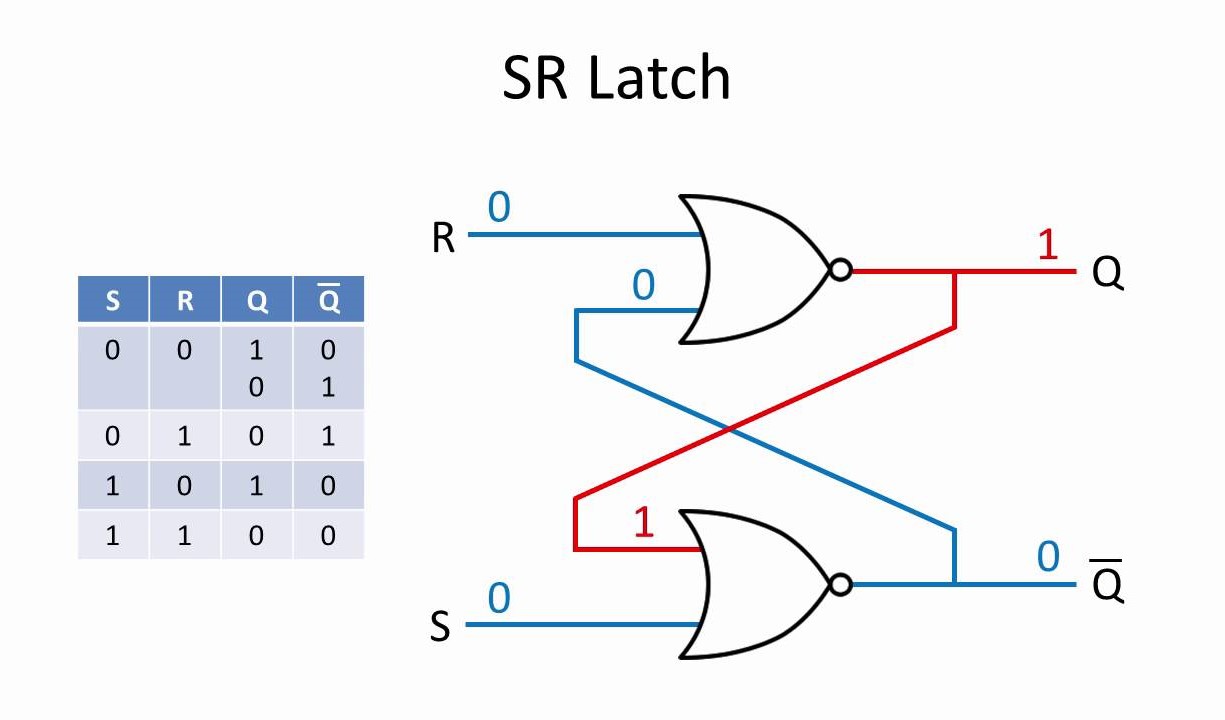
Figure 1 - S-R latch
Uses two inputs, Set and Reset.
The idea in the SR type is to make one of the outputs always be on (as long as there is current), and it works like a switch that changes the output only when the button assigned to the other value is pressed. For example, think of a button in a machine that is on or off. The S-R would be a good design base, for learning purposes, to sit in the electrical system and keep the machine on or off.
Looking at the bigger picture, to store 32 bits you need 32 of these and read the output of Q, for example, to get the actual data (it doesn’t really matter whether it’s the Q or $\bar{Q}$ here because the system is symmetrical, so it’s just arbitrarily decided the first time and later on it’s just replicated). If you need to erase the values, you can just pass the reset signal to every latch.
(There is one forbidden combination here. For this kind of latch, when both Set and Reset are 1 at the same time it returns an invalid output, because at the logic level it can’t be possible. The other case, both at 0, is just the hold state where it keeps whatever it had.)
If it doesn’t make sense watch this video
D - Latch
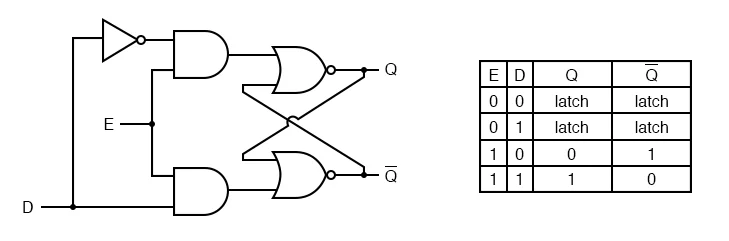
Figure 2 - D latch
Now instead of using two buttons to Set and Reset the state, we can centralize it in one and change the state by clicking this button with the Define. We added the NOT logic gate there that forces the system to be oppositely synced. We still have the CLK from before, but now it’s called the E (stands for enable) and works as usual.
With that, we remove the problem of an inconsistent state where both are off or on, for example. By enforcing opposite sync, we remove race conditions.
Flip-Flop
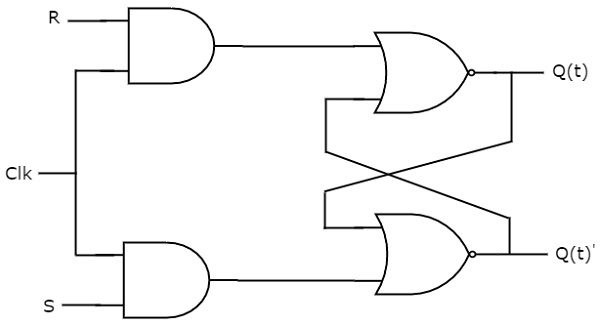
Figure 3 - Clocked SR flip-flop
The difference here is that it has 3 inputs, and there are these AND logic gates that lock the update to the clock. From now on, it can be updated based on time and will accept a signal only when the clock is high, so we can get a tempo for the execution, creating a more solid use for real world situations (strictly speaking this gated version is still level-sensitive, so it’s a clocked latch, a true flip-flop needs the edge-triggering we talked about, but the clocked idea is the important part here).
This setup also means we can save information based on the clock. Imagine the same CK wire is plugged into multiple flip-flops. We can save information and be certain it will maintain the same state until the next clock.
JK - Flip Flop
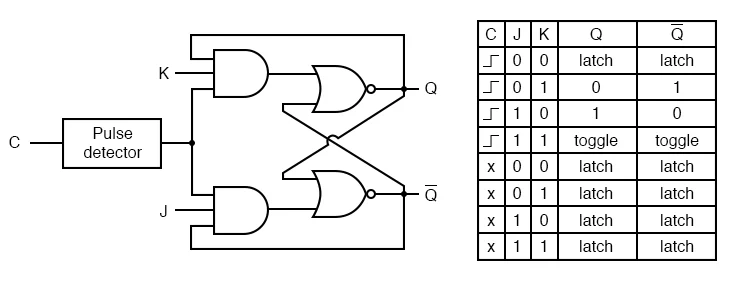
Figure 4 - JK flip-flop
Consider the pulse detector as the clock we already saw before. We can spot that the difference is these extra lines going from the end back to the start (important to remember is that this AND from the image needs all 3 inputs to activate). These lines ensure that there is no faulty state like J and K both equal to 1, because even if that happens, the output will still have only one line high.
This creates a possible race condition though. If you keep both J and K clicked and the clock stays high for some time, the output is undefined until we release the buttons or the clock button. You can think of that as the processing time of the current passing through the wires being the final state decider.
T - Flip Flop
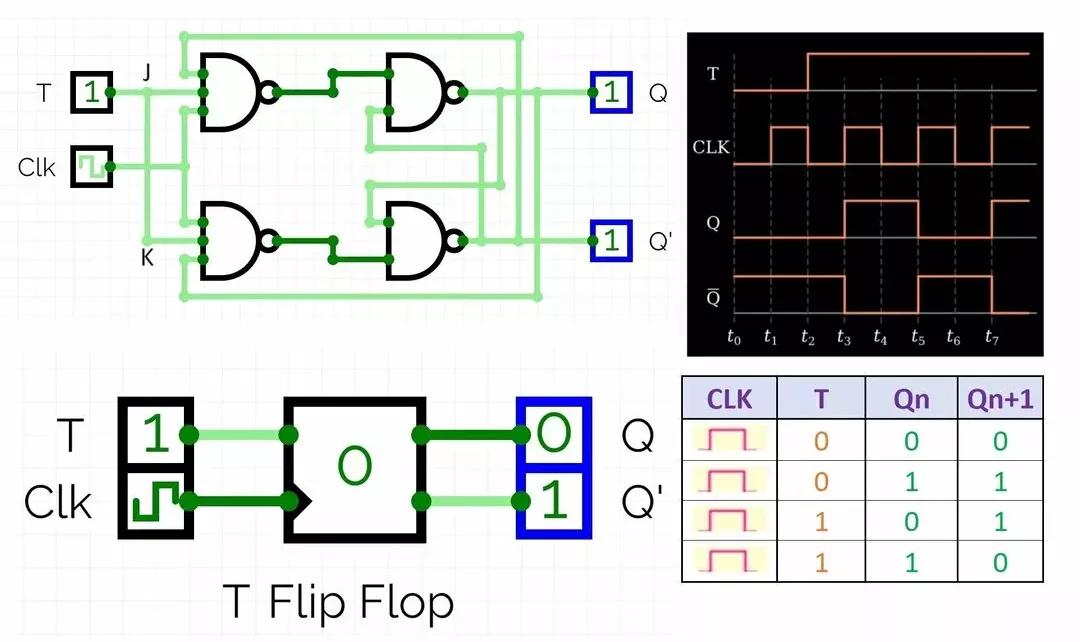
Figure 5 - T flip-flop Source: hackatronic.com
Here would be a variation of the JK but unifying the J and K input. This results in the output state changing from one to another (when the clock is high, of course), as you can see in the truth table. It looks a bit useless, but there is a good application for it, counting.
You put one after another, holding every T high and linking one output to the clock of the next one. This way, it’s like passing the values forward, and the first flip-flop (the least significant bit) toggles every CLK cycle.
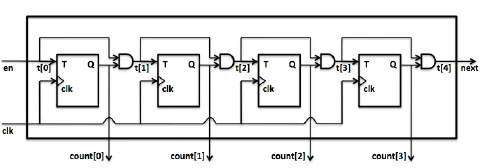
Figure 6 - T flip-flops chained as a counter Source: ResearchGate
So, at first the value will be $0000$, then we have the first cycle, and the first flip flop output will turn to $0001$. When the next cycle arrives, the first latch will turn its output to zero, and the value will be passed to the next flip-flop, so the bit counter will be $0010$. The third cycle arrives, the output of the first flip flop turns 1 again, and the counter will change to $0011$. Then every cycle the binary numeral will increase by one. You can also think that every cycle means adding one to the counter (considering the T is always high).
0000 → 0001 → 0010 → 0011 → 0100 → 0101 → … → 1111 → 0000
The max value we can count in this 4-bit setup is 15 (1111), giving 16 distinct states, then it returns to zero.
Registers
This part is going to be half baked tbh. There are too many things to cover and I don’t have the technical knowledge or the didactics to abstract everything.
Registers are the blocks used by the CPU or processing unit to manage data. I’m going to focus on normal CPUs to smooth the transition/pivot to the next posts.
The actual structure of the register can vary, so I will show the CPU internal registers and cache systems, starting with the architectural registers. There are multiple types/classes of internal registers.
From the architectural registers, there are the General-purpose registers (GPRs), Floating-point registers (FPRs), Vector / SIMD registers (going to talk about these guys in the post about database optimization, I guess), Program counter (PC), Stack pointer (SP), Status / flag registers, Control / System registers, and Segment registers. As for the pipeline-stage registers, there are IF/ID, ID/EX, EX/MEM and MEM/WB. Depending on the processor architecture, the registers will have different sizes, like 8, 16, 32, 64, 128, 256 or 512 bits. The 32 and 64 are the most popular these days for home computers and servers, and because of that popularity they are more compatible with most software and applications.
These registers, except for some GPRs, the FPRs, and the Vector/SIMD registers, are all D flip-flop type (for reference, the D flip-flop is two D latches chained in a master-slave setup so it captures the value on the clock edge instead of staying transparent the whole time the enable is high), and this is mostly because of the reliability. The SR latch has an inconsistent state at S=R=1, and the JK has undefined behavior when changing the value while the clock is active. The D doesn’t have any of these problems because the only possible output is 0 or 1 regardless of the situation, as we can see in the truth table:
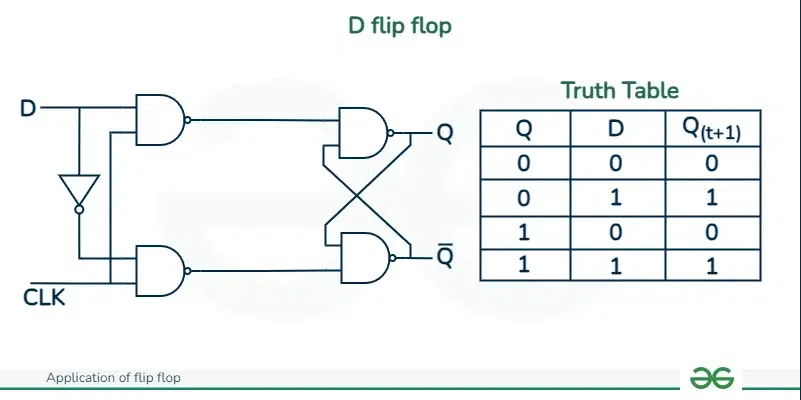
Figure 7 - D flip-flop truth table Source: GeeksforGeeks
I tried to find some flip-flops at the silicon die level, but it’s integrated into the chip, and I couldn’t find any good images representing it. If you are interested in a deeper level, I recommend this Wikipedia page about flip flops as the guide.
If you are curious about the silicon die, here is one example from Ken Shirriff’s blog of the Intel 8086 processor:
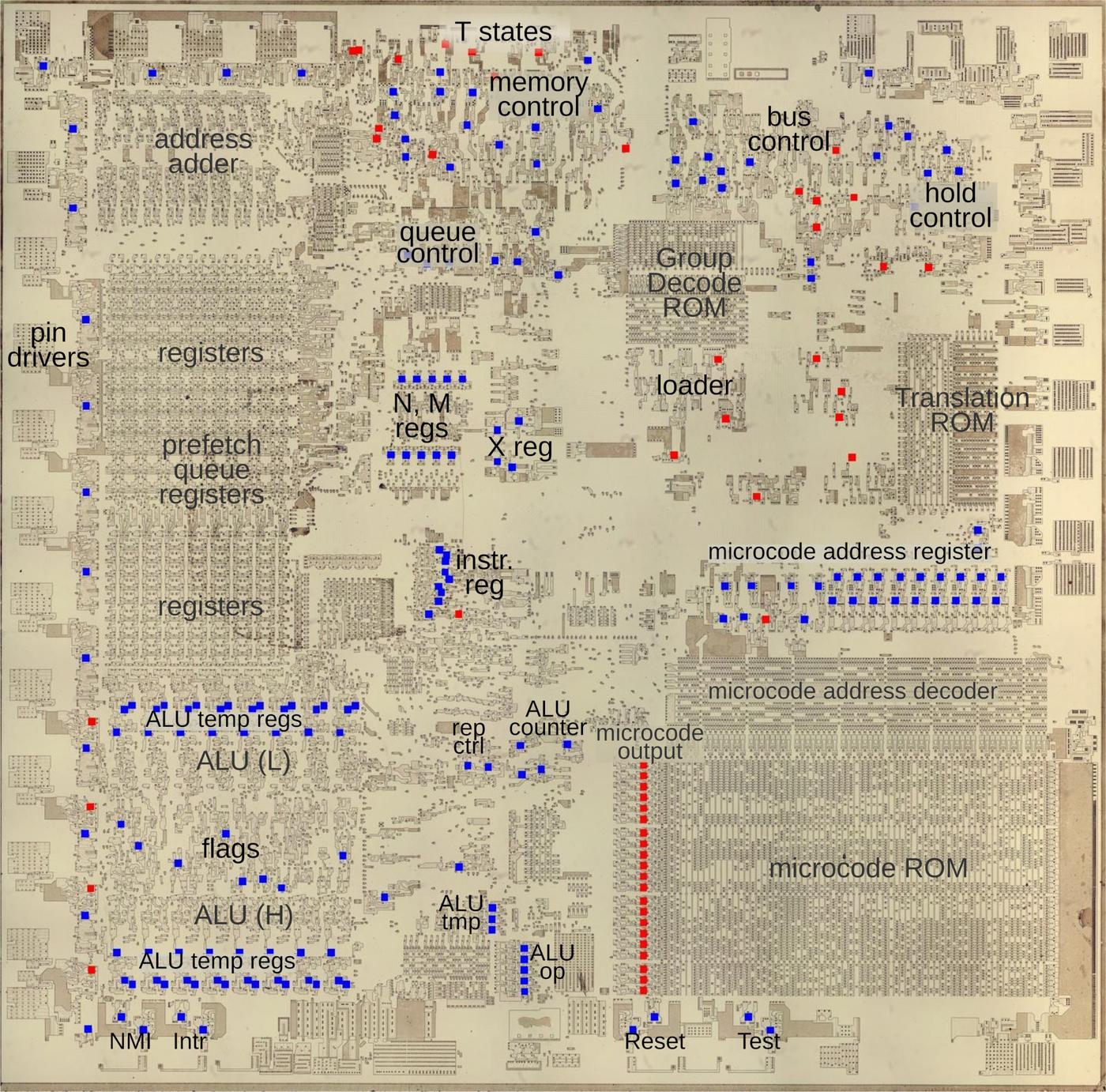
Figure 8 - Flip-flops on the Intel 8086 silicon die Source: Ken Shirriff’s blog (Intel 8086 flip-flops)
I intend to write about processor architectures in the future, but don’t know when, and I’m still missing too much technically speaking
A small recap: we now know about some of the lowest possible structures used to store bits, and we also know that this structure (D flip-flops) is used in the internals and in the pipelines connecting processes. But what about the next level? The processor cache (L1, L2, L3, …) and what about even farther memories? The RAM, VRAM, and so on?
Cache memory
For bigger blocks of memory, the processor has to rely on other storage systems apart from the registers, and the next ones in the queue of memory capacity are the L1, L2 and L3. You can think of these as the first, second and third levels/lines. They increase progressively in size and decrease in speed when it comes to the time it takes to get or insert some data into them.
Here is one example of a multi-core architecture with the L1, L2, L3 labeled in the image.
If you are interested I recommend this thread and the blog post from pikuma (source of the image below)
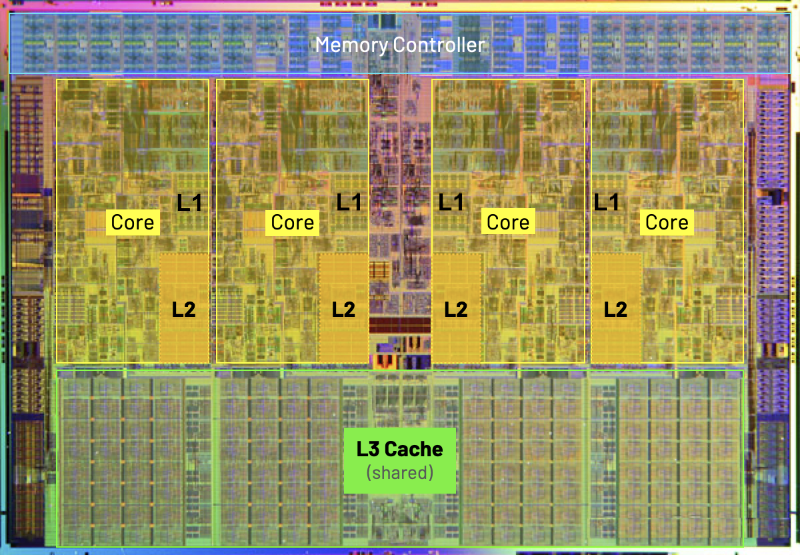
Figure 9 - L1/L2/L3 cache in a multi-core CPU Source: Pikuma (understanding computer cache)
Now, getting back to the theme itself, these L memories don’t use the D flip-flop architecture but the SRAM.
SRAM
Standing for static random-access memory (SRAM), this memory’s main purpose is to be compact and fast while maintaining reliability. We are going to use the 6T SRAM cell architecture as a base because this is the most common one. There is also the 4T (T stands for transistor here), and even being smaller, this one suffers from stability and data leakage. (I’m still not proficient enough in electronics to explain the leakage, but it’s associated with the resistor load being high enough to minimize the current or something. This point is also 100% open to revision, and I intend to write more about it when I feel ready).
The S in SRAM differs from the D in DRAM (next topic) in the meaning of static and dynamic. Static stands for the state of the saved bit, which is going to be the same forever as long as there is current, while the dynamic one has to be rehydrated or otherwise it loses the saved data, a deeper approach comes later in the text.
Here is the simplified diagram of the 6T SRAM (6 transistors Static Random Access Memory):
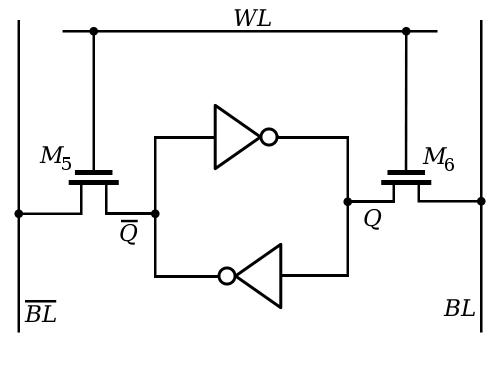
Figure 10 - Simplified 6T SRAM cell (inverter loop) Source: Wikimedia Commons

Click to see the real cell design
They are the same, but this one shows all the transistors instead of the high level view:
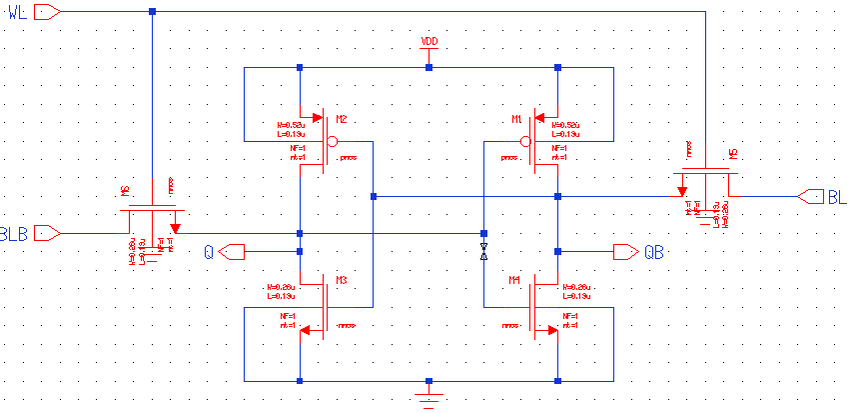
Figure 11 - Standard 6T SRAM cell Source: ResearchGate (Standard 6T SRAM cell)
Starting with these dual NOT logic gates, this gate changes the input so that if 1 is entered, the other side will be 0:
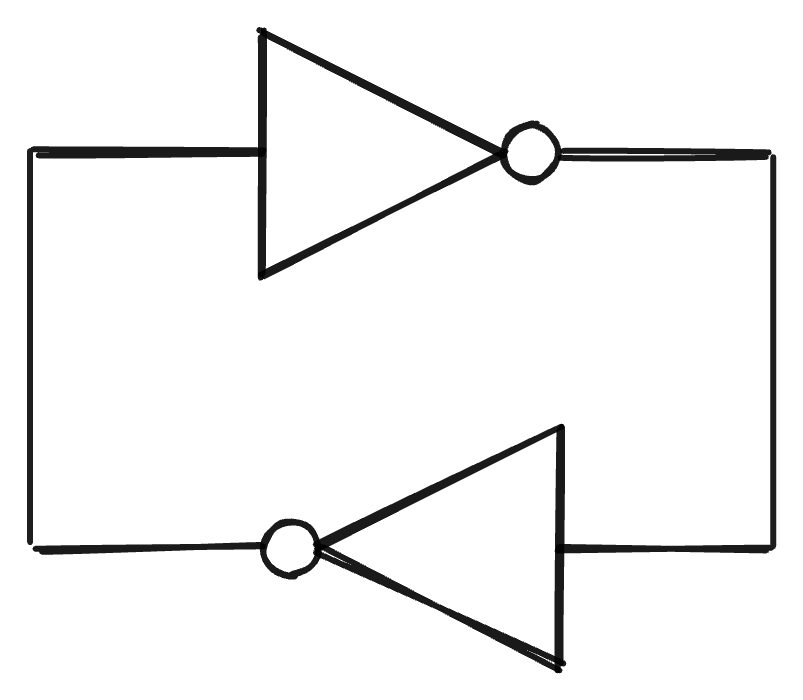
Figure 12 - Cross-coupled NOT gates (the storage loop)
As simple as it gets, it will just invert the signal.
Here there are two transistors that just link the output of the dual gate inside to the outside. So, if the wordline is one, this gate will be open, otherwise it won’t. (The transistor can be used as a gate and as an amplifier. In this case it’s used as the gate connection, and the gate controller is this wordline).
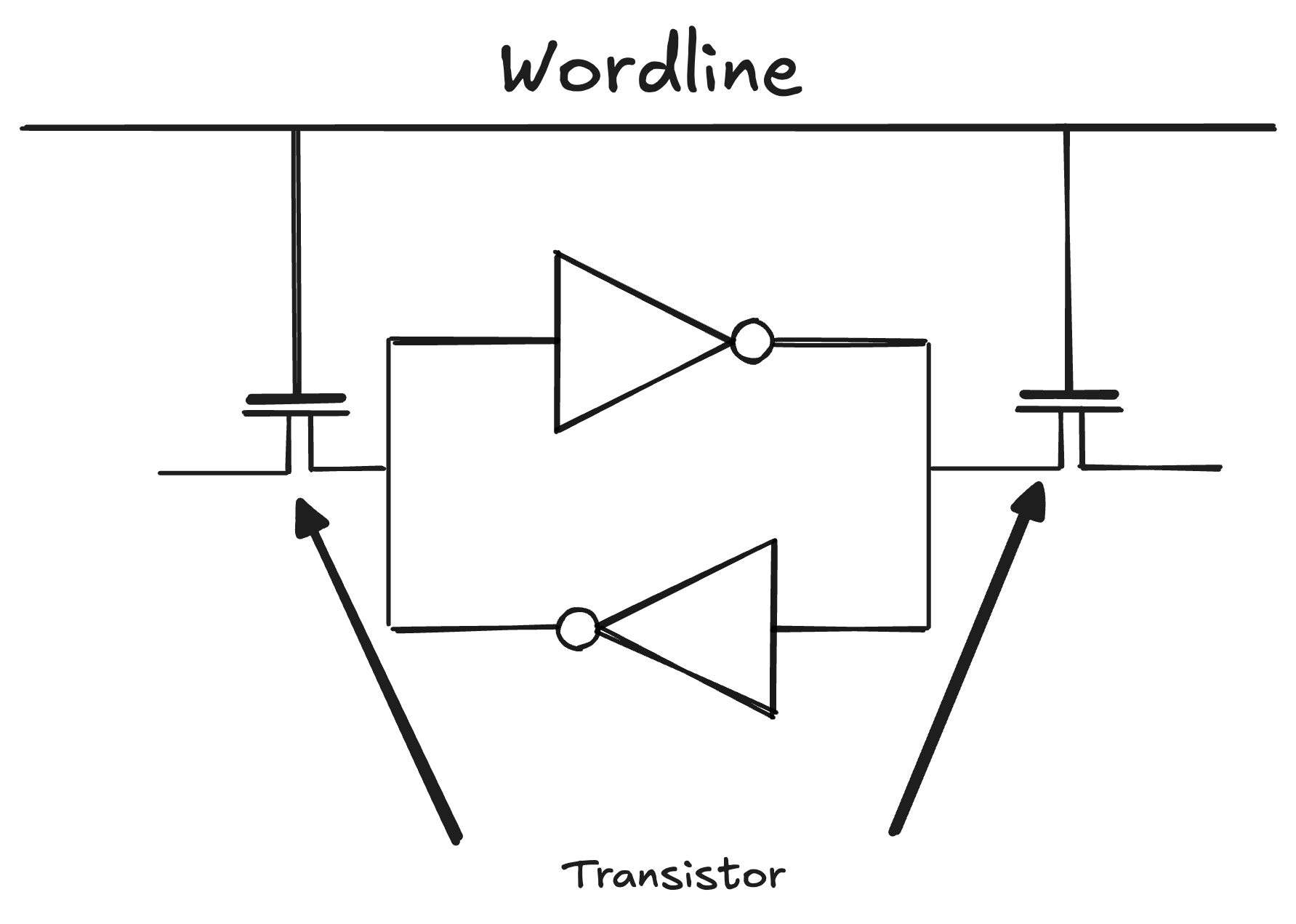
Figure 13 - Access transistors gated by the wordline
You can think of this wordline as a row selector, used by higher level systems to decide which transistor will be used. The wordline is the connection to the data wires $BL$ and $\bar{BL}$, and without it we can’t access the data inside the circuit from any outside system. Don’t forget that each SRAM structure represents one bit, so we have to find a way to manage them to make different sizes of data, for example 1 byte, which has to group 8 of these in sequence. We can also use the wordline number for addressing, because these structures will be grouped, so we have to use something to address the exact place each bit is located.
And now for the $BL$ and the $\bar{BL}$ from the simplified drawing. It stands for Bitline, and the one with the bar carries the complement of the other ($\bar{BL}$ is always the inverse of $BL$). Later on we are going to use them to find out if a value is 1 or 0 based on the current on them.
Read
Here is how we interpret the data coming from $BL$ and $\bar{BL}$. Important to say that when we talk about a data signal of 0 or 1, it is actually:
- 0: Close to 0V or GND/Vss, which stands for “Voltage Source Supply” (this one exists mostly on MOS/CMOS and FETs, which is our case).
- 1: Equal to 1V, or positive in general, which can be called Vdd, standing for “Voltage drain drain”.
To read the data from $BL$ and $\bar{BL}$, we compare the voltage from the first one with the second, so:
- $BL > \bar{BL} = 1$
- $BL < \bar{BL} = 0$
For the read to happen we have to make the wordline active, otherwise the data caught is from another memory cell.
This comparison is done using a differential sense amplifier, and the general idea for sense amplifiers is REALLY well explained in this video. Not going to lie, I spent quite a bit of time understanding this whole SRAM composition, and to be honest, mostly because of the electrical part, which I understood nothing about at the start.
The sense amplifier’s goal is to amplify, of course, but why? Because there is noise in the signal, and when we talk about extremely small transistors, the capacity to ground the voltage or increase it is smaller than in denser transistors. So we do the trick of amplifying the signal and comparing afterward. This way we get a better output, not perfect, but it doesn’t matter. Comparing 0.99 to 0.5 is much better than comparing 0.8 to 0.64, for example, because when the difference is minimal, the chance of missing because of noise is big. Fixing the difference problem, we can get a clean digital output with minimal trickery afterward and actually use the data from the bits. In the image below, we can see the moment things happen:
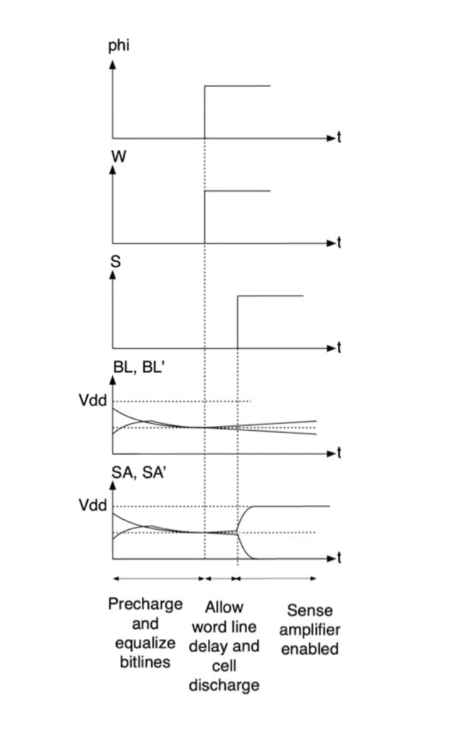
Figure 14 - Differential sense amplifier amplifying the bitline difference Source: YouTube (sense amplifier explanation)
The precharge is a prerequisite to read and write. In SRAM both bitlines are usually precharged high (to Vdd), and during the read the cell pulls one of them slightly down so the sense amplifier can catch the difference. It’s not exactly that, but this is ok for the intuition. Then we connect the wordline, and the data is passed onwards to the sense amplifier, which, as we can see, amplifies the voltage exponentially, and then the data is passed to the next stages of the pipeline.
Write
Writing into the SRAM (6T) is simple. We just have to activate the wordline and pass the data to the bitline and bitline bar. The inside system with two NOT gates and the Vss (ground or 0V) and Vdd (voltage drain or 1V for us) will do the job of normalizing the current inside, and the SRAM also works as a sense amplifier.
When I say 1V or 0V it’s mostly a simplification, but for didactics it works (in the real world it can be other values or approximations, a reason for the sense amplifier to exist if you think about it).
After the bitlines pass the inverted voltage and the wordline disconnects, we get the data stored in the system.
SRAM System
This is a schema of a 48-bit SRAM group (the least ugly and most visually friendly architecture I could find, tbh). I will not explain the drivers, decoders, and go deeper on sense amplifiers today, but it’s good to know these things exist as a whole.
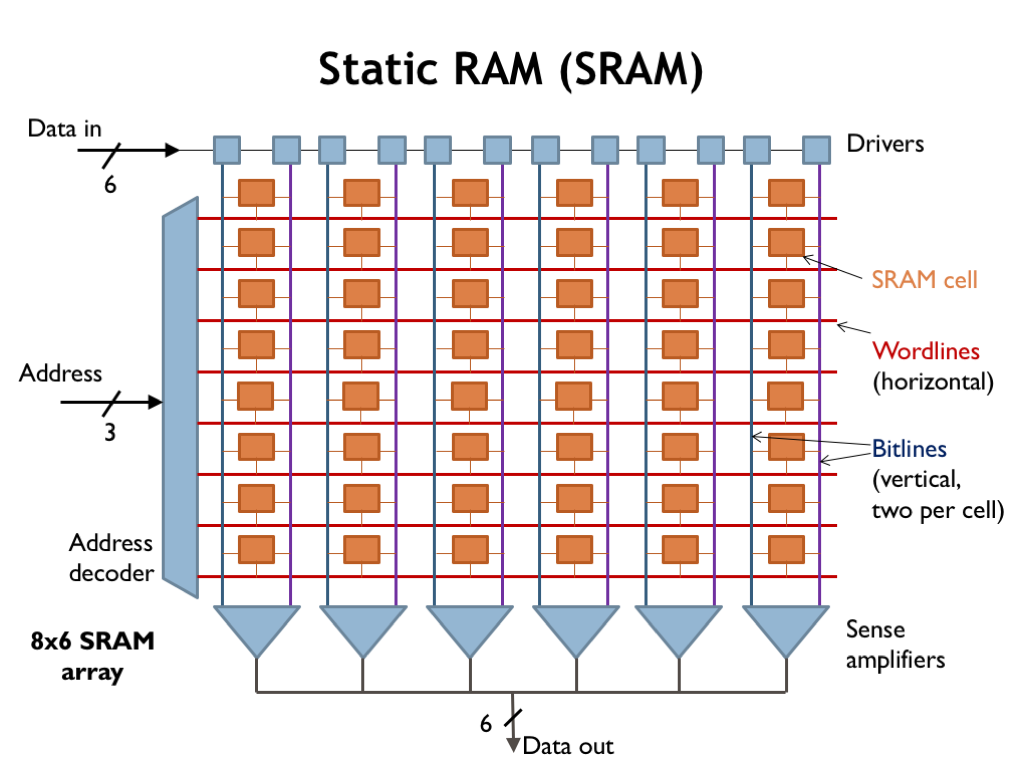
Figure 15 - 48-bit SRAM array (decoder, drivers, sense amplifiers) Source: aeapr.com.br
A more realistic and complete drawing would be this one, but with 32-bit 6x4:
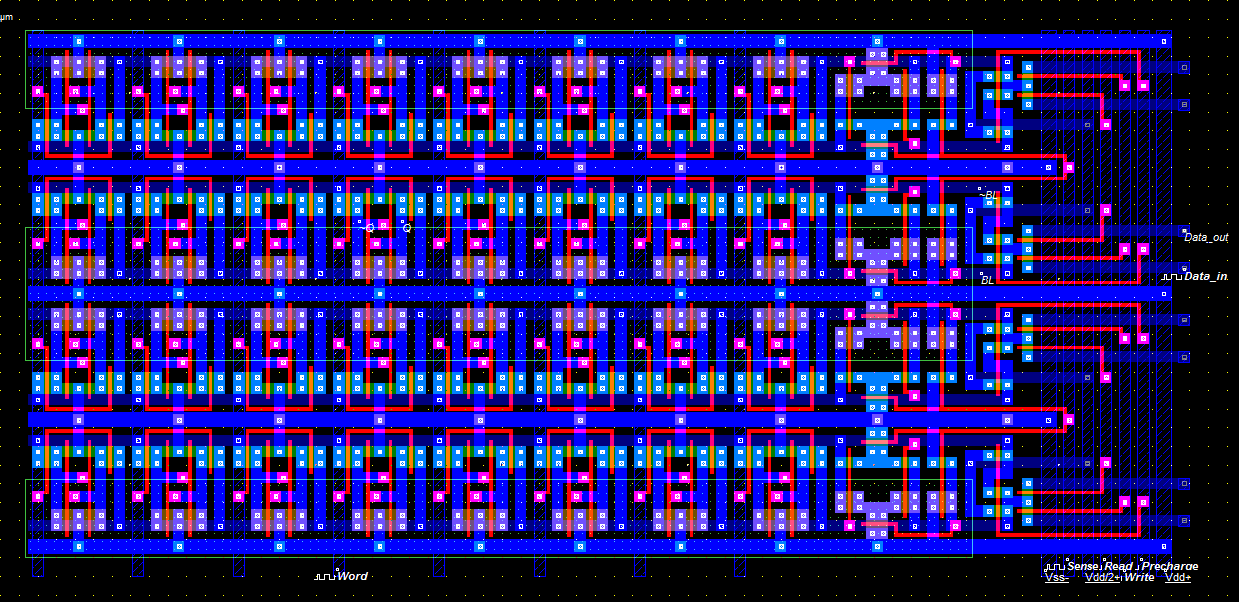
Figure 16 - 32-bit SRAM array (6x4) Source: The Fragmentation Paradox (SRAM memories)
I think the intuition and the perception of the SRAM architecture and functionality are well developed, so let’s move to the DRAM, the memory system behind the RAM in your pc.
DRAM
For the DRAM, let’s remember what it stands for: Dynamic Random Access Memory. The difference here is that we have to keep charging the system, otherwise it “forgets” what the value of the bit is.
So, for a start, let’s see what a capacitor is while looking at this representation:
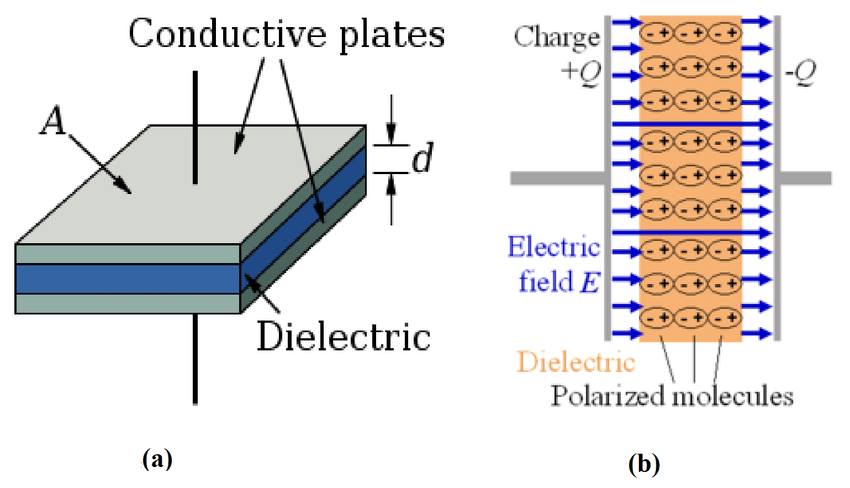
Figure 17 - Parallel-plate capacitor Source: ResearchGate (parallel-plate capacitor schematic)
The purpose of the capacitor is to store energy. The design is as simple as it can be, the capacitor has two conductive plates on the sides and the dielectric in the middle. The two conductive plates have opposite charge and the dielectric prevents the energy from passing from one to another, so the energy sits there. Important to say that it doesn’t stay there forever, it leaks progressively. The dielectric is not perfect, it has some tiny conductivity, and the transistor that blocks the current access also has some leakage. With enough time it’s normal for the current to change from the original value.
Now we know the capacitor functionality and limitations. This is the design for the DRAM:
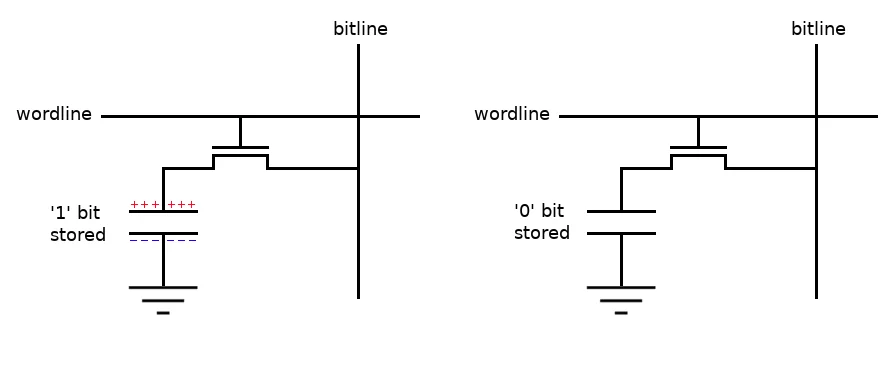
Figure 18 - DRAM cell (1T1C) Source: mean9park (DRAM Operation)
We have the capacitor storing the value and one transistor connecting the bitline that’s activated based on the wordline. And that’s it. The functionality of the writing and reading is similar to the SRAM storage system when it comes to wordline and bitline, but here there is only one bitline instead of two. Now, instead of 6T or 6 transistors, we just need one capacitor and one transistor to store a bit. The size of the system for each bit is much smaller, and with that we can put a lot more DRAMs in a smaller space, which we call a denser memory system.
But it’s not all flowers. As I said before, the capacitor leaks, and this changes the default features from the SRAM memory. The DRAM will have to be Dynamically refreshed (name mentioned! Dynamic Random Access Memory), so let’s see how it works.
Refreshing
We can think of the refresh as a READ and WRITE operation that has to run once in a while to keep the data “reliable”. I said reliable because it’s not that concrete, we are working with a different current in an analog signal and transforming it into a digital output. So, for the analog signal we have the bitline precharged to Vdd/2 or 0.5V for didactics as I said before, the Vdd or 1V will be the 1, and the GND or 0V will be the 0 (the wordline is just a digital on/off gate, driven to Vdd to open the access transistor, so it’s not the Vdd/2 one).
Taking that into consideration, the leak will happen to the point where the sense amplifier will not recognize if it’s one or the other. You could say that the GND/0 will stay at 0 so it will always know, right? No, because the 0V is also being leaked, since the capacitor and the transistor connecting the wordline leak, so it keeps drifting from GND towards Vdd/2. Knowing it leaks from both sides, we have to refresh the data within a safe interval to guarantee its reliability, and this one is 64ms according to the standard set by the industry. Not gonna dive into this point, but this value is a sweet spot considering the temperature (leakage roughly doubles every 10°C), the capacitor’s insulator (a measure of how much it prevents energy throughput), transistor leakage, and some other factors.
Important to say that the write operation will only happen at row level, so the refresh can’t be done on all cells simultaneously. In reality the refresh is happening basically all the time, because it keeps going from row to row, and every 64ms it refreshes all the rows in the Bank (group of dram cells).
The first state is the dram cell charge degradation in row 3, which was originally 1V, 0V and 1V respectively:
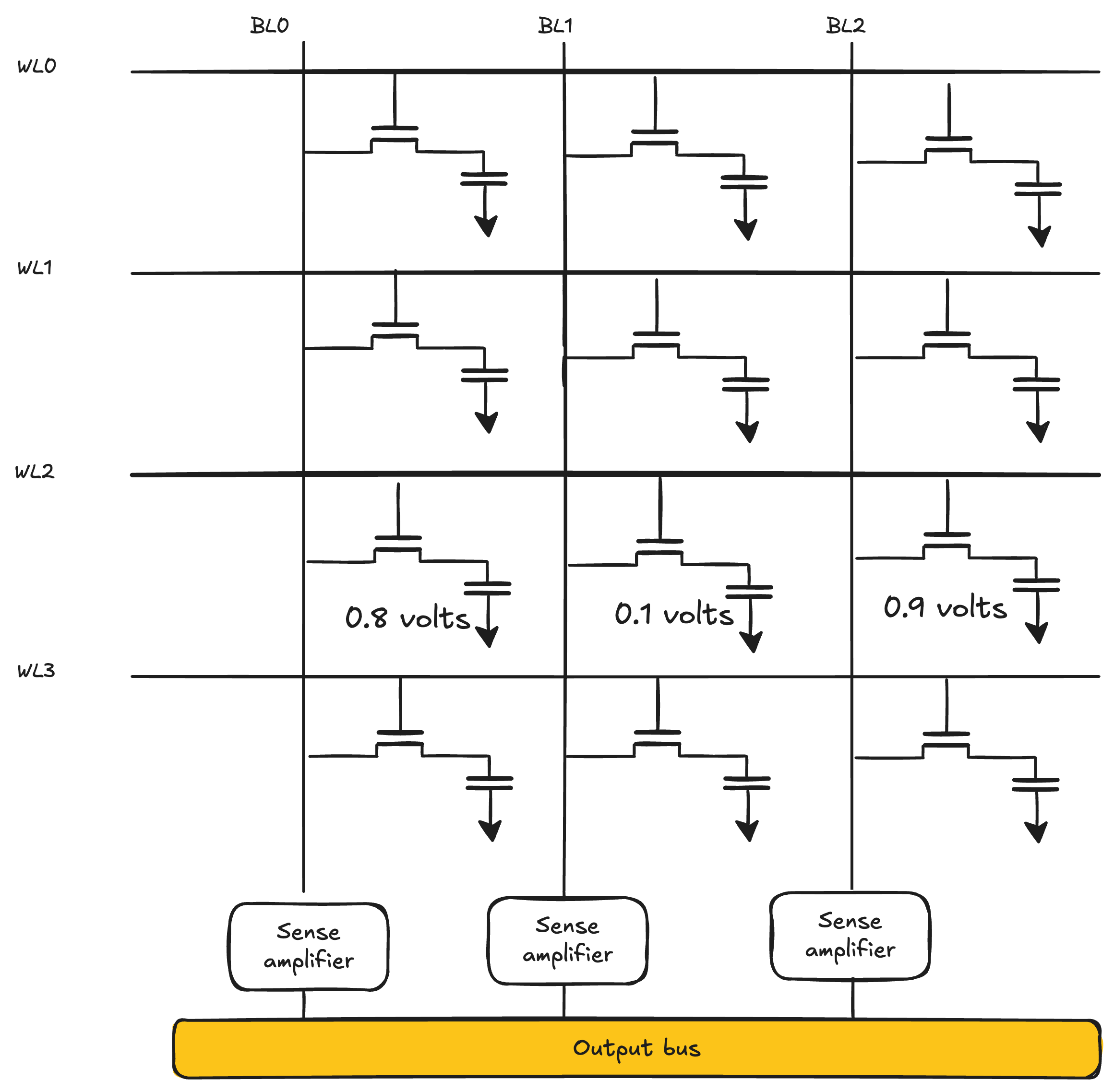
Figure 19 - Refresh step 1: charge degradation
The second state is the Bitline charging to Vdd/2 or 0.5V in the example:
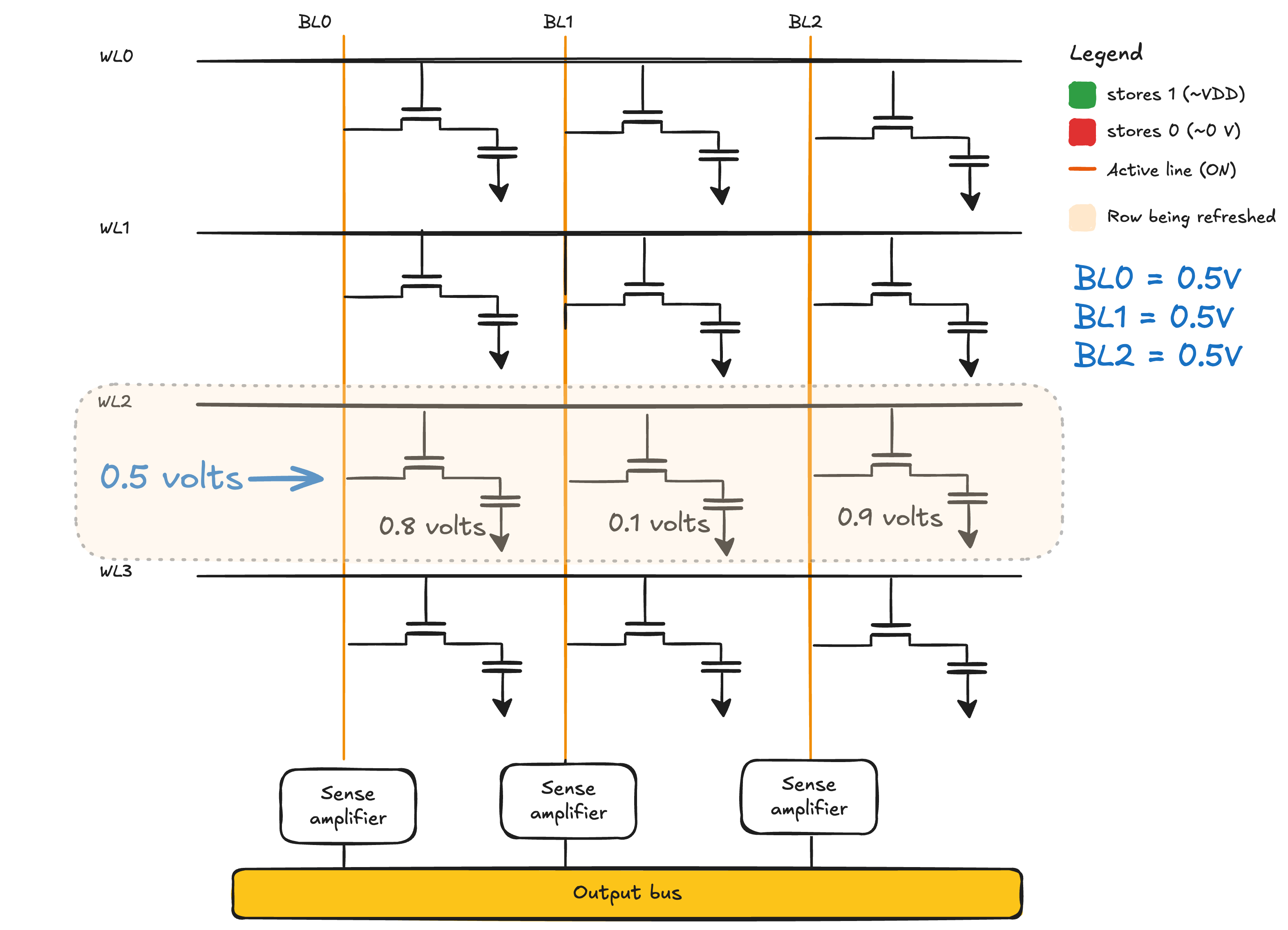
Figure 20 - Refresh step 2: bitline precharged to Vdd/2
In the third state the wordline is activated and the bitline starts to equalize the current towards the charge inside the DRAM cell.
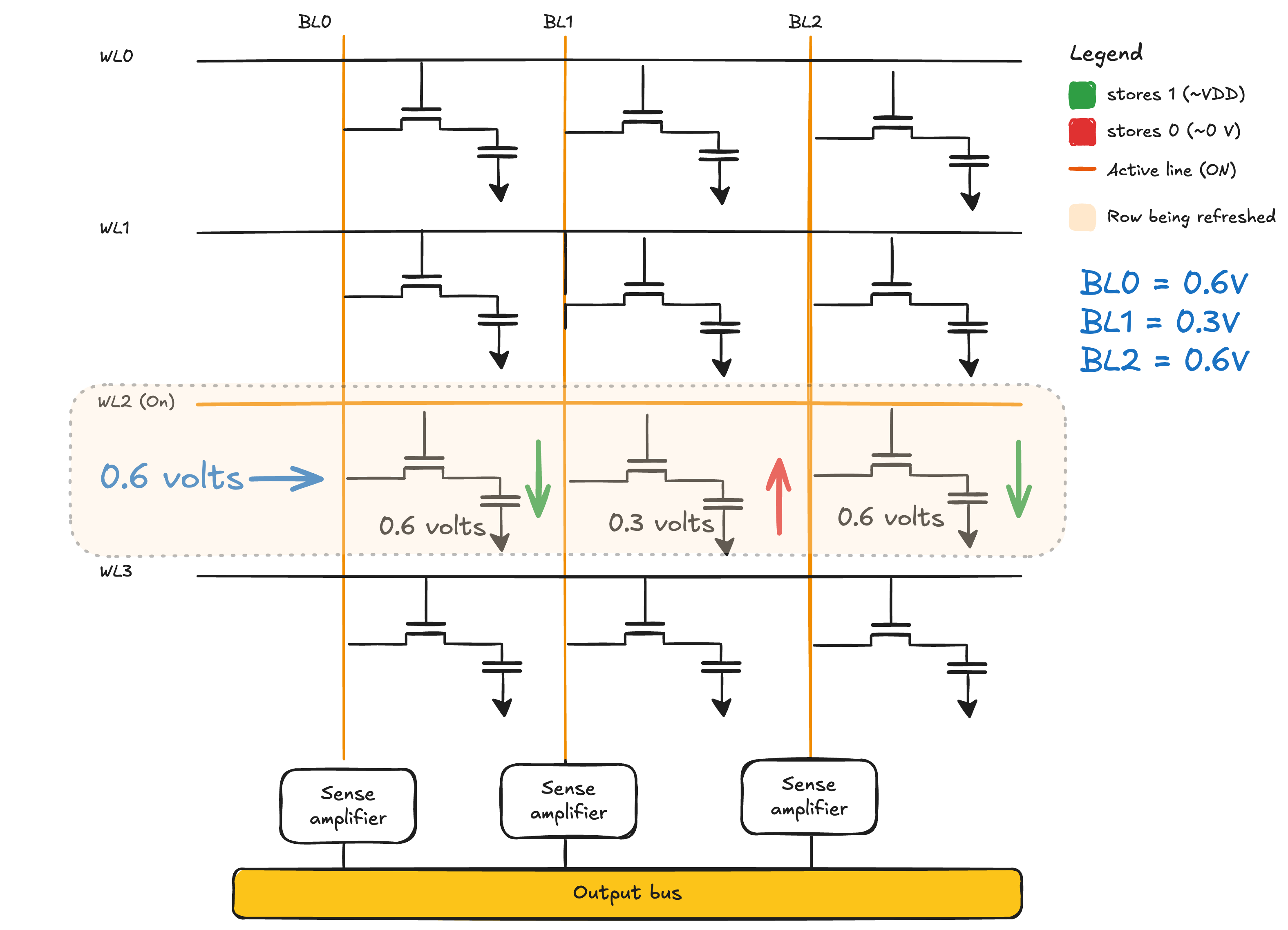
Figure 21 - Refresh step 3: charge sharing
Technically the previous state would be the last one because the Sense Amplifier is connected directly to the bitline, but for simplification reasons here is the final one. The sense amplifier will identify the change in the bitline and amplify the current towards the identified charge. It works similarly to the SRAM, but now we have only one line.
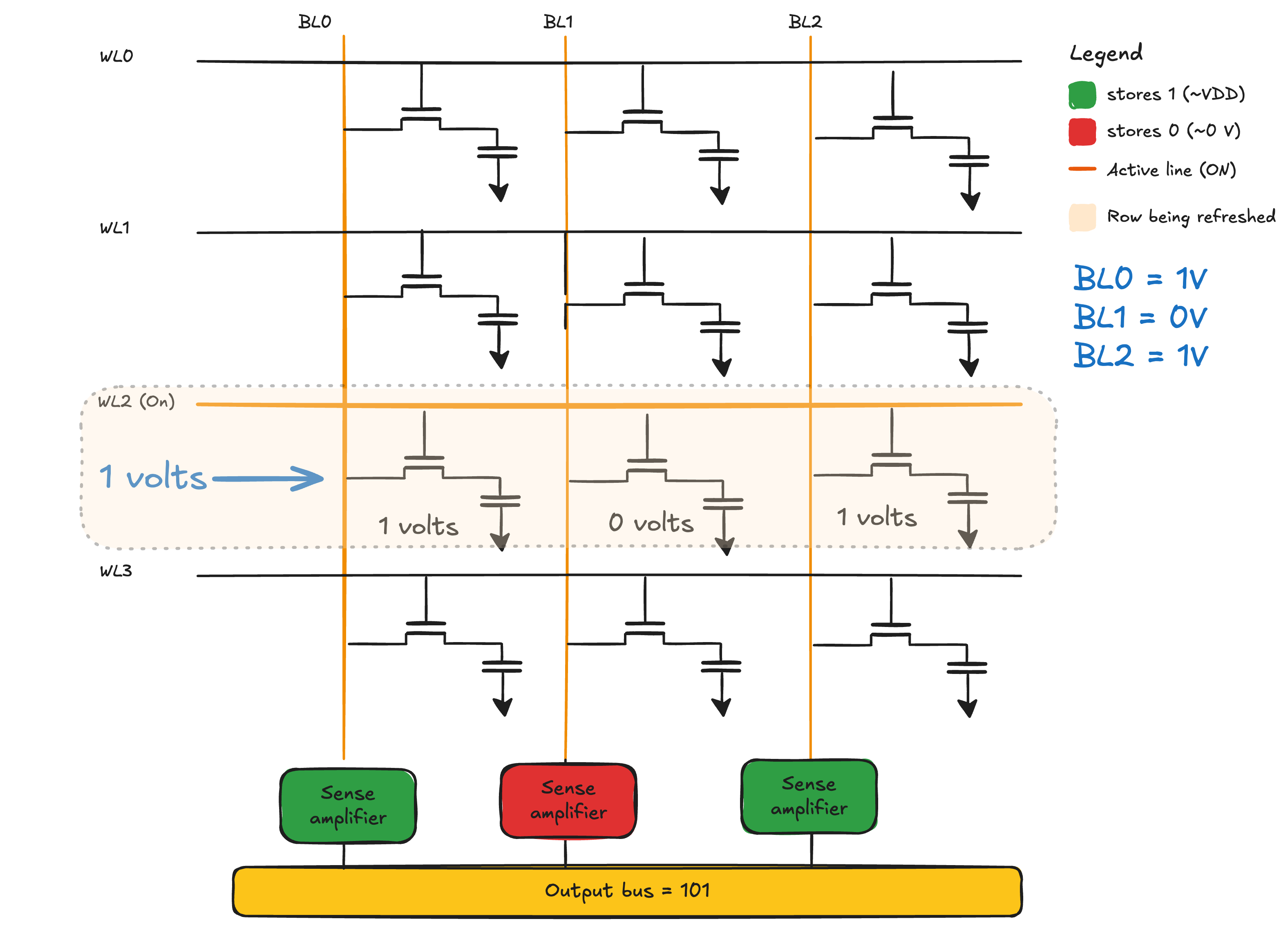
Figure 22 - Refresh step 4: sense amplifier restores the value
Architecture
I think the refreshing topic also explained the read and the write (refresh does both if you think a bit about it). Here I’m gonna get straight to the point because the post is getting too long, again…
The architecture of the DRAM blocks of memory is divided into Channel > DIMM > Rank > Chip > Bank > Row/column > DRAM cell:
- Channel: The bus between CPU and memory.
- DIMM: The physical stick you plug into a slot.
- Rank: A group of chips on a DIMM that fire together to deliver one full data word.
- Chip: A single DRAM IC, only provides part of the data word (x4, x8, or x16 bits wide).
- Bank: An independent sub-array inside a chip, banks work in parallel.
- Row: A line of cells inside a bank that gets “opened” as a unit.
- Column: Within an open row, picks which bits to actually read or write.
- Cell: One transistor plus one capacitor. Stores a single bit.
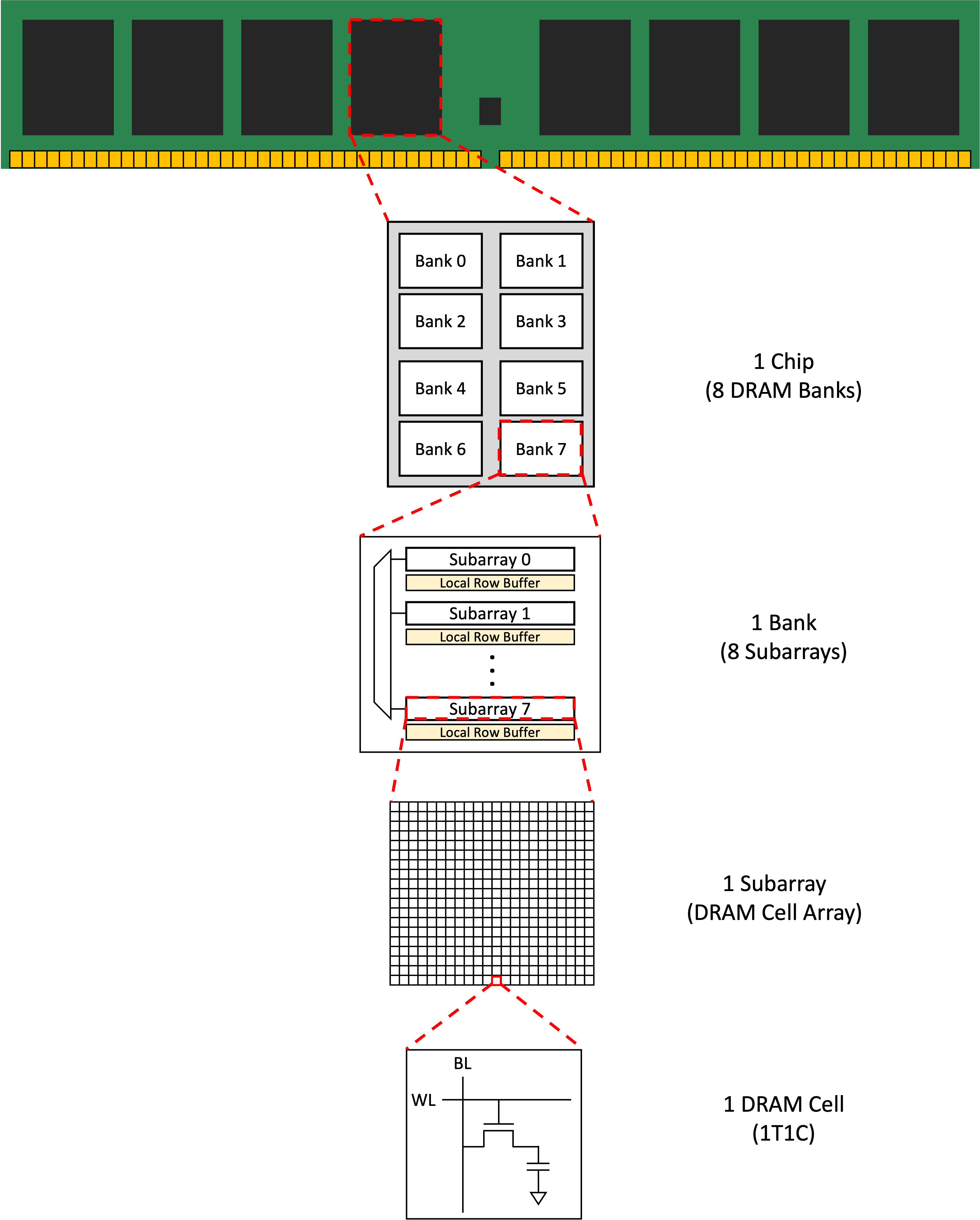
Figure 23 - DRAM chip and bank hierarchy Source: mean9park (DRAM Operation)
For those interested in DRAM, the most complete post I read about it was this.
As I said before, I’m not gonna dive deeper than this today, because it would stray too far from the focus, which is memory itself.
Other types
This one is mostly for curiosity and to call a spade a spade. I really do intend to write more about these topics in the near future by the way, but they are usually too dense and I’m a bit lazy…
With the basics of the DRAM cell architecture we can move to some newer systems. Since the 2000’s the industry has used the DDR, yes the one from DDR1, DDR2, DDR3, DDR4 and DDR5. It stands for double data rate, since every cycle of the clock (the clk we talked about) it makes two transfers.
VRAM
There is the memory used internally in graphics cards (GPU) which people usually call VRAM. This one can mean GDDR, which is the previous DDR but specialized for graphics (usually meaning more parallelism and vectorization), but some high-end GPUs these days, mainly because of AI acceleration, use HBM, which stands for high bandwidth memory. The main difference in these, besides the parallelization, is that it’s still random-access DRAM under the hood but tuned for sequential/streaming access patterns (wider buses, more banks, burst oriented), so you get more throughput when the access is coalesced (gonna talk more about that later too) and more raw capacity. These types of memory can be found in:
| Memory | Bandwidth | Typical capacity | Where you find it |
|---|---|---|---|
| DDR5-6400 (CPU) | ~50 GB/s per channel | 32-128 GB | Desktops, laptops, servers |
| LPDDR5X (mobile) | ~70 GB/s per channel | 8-32 GB | Phones, ultrabooks |
| GDDR6 | ~500-700 GB/s | 8-24 GB | Gaming GPUs |
| GDDR6X | ~1 TB/s | 8-24 GB | RTX 4080/4090 |
| GDDR7 | ~1.5 TB/s | 12-32 GB | RTX 50-series |
| HBM3 | ~3 TB/s | 80-141 GB | H100, MI300 |
| HBM3E | ~8 TB/s | 141-192 GB | B200, MI325X |
TPU
Then there is the TPU which uses all of them, but the focus is on matrix multiplication, basically aiming for AI in training, optimizing and developing models, which under the hood is all matrix operations. I mentioned this one mostly to set in stone that I’m gonna write a post in the future completely focused on it. It will be after the neural networks part 2 and the transformers, RAG, dense retrieval I guess, but it will happen.
References
Recommendations for those who came to peek:
- Memory circuits pdf
- SRAM memories, the most technical, high-quality content I’ve read
- SRAM architecture lecture
- Ben eater is the recommendation for anything related to electronics and flip-flops
- Sense amplifiers intuition drawing
Other articles, blog posts and references mentioned along the way: